
Scanreco Remote System Configurator
Specifying a radio remote control system should not mean flipping through datasheets and hoping the parts match.
Today, we are launching the Scanreco Configurator to make remote system configuration faster, clearer, and more reliable for engineers, integrators, and service teams.
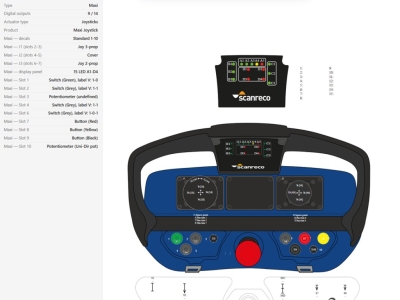
The Scanreco Configurator is a guided tool that helps you build a complete Scanreco Maxi or Mini remote system step by step — covering transmitter, receiver, software, and a full system overview — with selections that update your technical drawing in real time.
What You Configure
The configurator walks you through three key areas:
- Transmitter — choose your housing, buttons, joysticks, and control layout for Maxi or Mini platforms
- Receiver — select the output type, connector options, and mounting configuration to match your machine
- Additional Info - specify any additional details you want us to know, and we will take it into consideration when reviewing your config
Each section is independent. You can jump between tabs at any time to review or adjust your choices without losing your progress.


Why We Built It
Putting together a Scanreco system typically involves cross-referencing multiple documents, confirming compatibility between transmitter and receiver variants, and manually writing up a specification. That process takes time and leaves room for errors that only surface after an order is placed.
The Scanreco Configurator turns this into a structured workflow. Selections are reflected immediately in a live technical drawing, so you can see exactly what you are building as you build it.
What Happens After You Send
Once your configuration is complete, you submit it directly by email to our technical team for review. You move from draft setup to expert-confirmed solution in one continuous flow — no back-and-forth, no reformatting.
Available Now
The Scanreco Configurator is live now.
If you work with Scanreco Maxi or Mini systems and want a faster, more accurate way to specify them, this tool is built for you.